 by
by Microsoft Agents 365 SDK, Microsoft Agents SDK and Microsoft Agent Framework are distinct yet complementary components. There has been many questions on how they work together or interact together. Let me try to explain them below.
The Microsoft Agents SDK serves as middleware for Conversational Agents, enabling connections across various surfaces like Teams and Copilot Studio, all while adhering to a standard Activity/Agent orchestration protocol. Documentation link here – https://learn.microsoft.com/en-us/microsoft-365/agents-sdk/agents-sdk-overview
On the other hand, the Microsoft Agents Framework is designed as the foundational structure for AI Agents and multi-agent workflows, capable of addressing any Agentic requirement. Documentation link here – https://learn.microsoft.com/en-us/agent-framework/overview/?pivots=programming-language-csharp
In essence, you can build your channels using the Agents SDK which then integrates into the Agents build using Agent Framework to handle the core tasks involved in Agentic implementation.
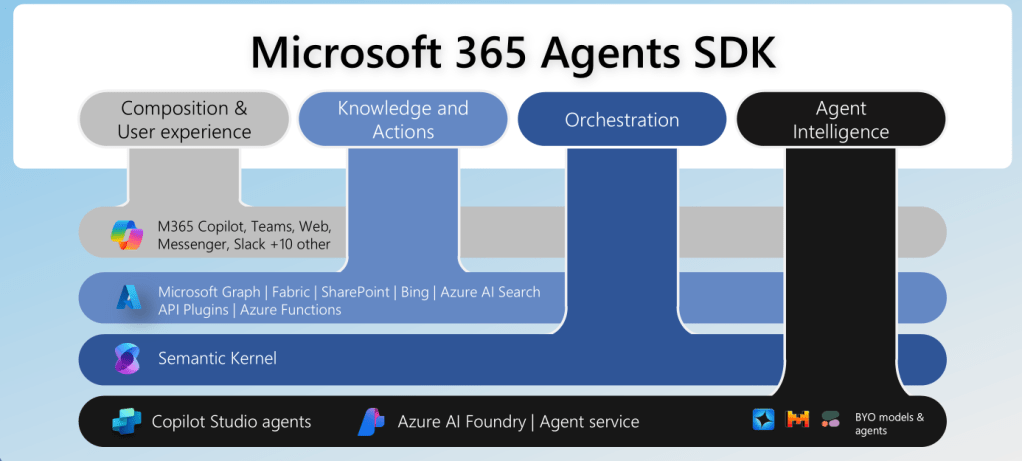
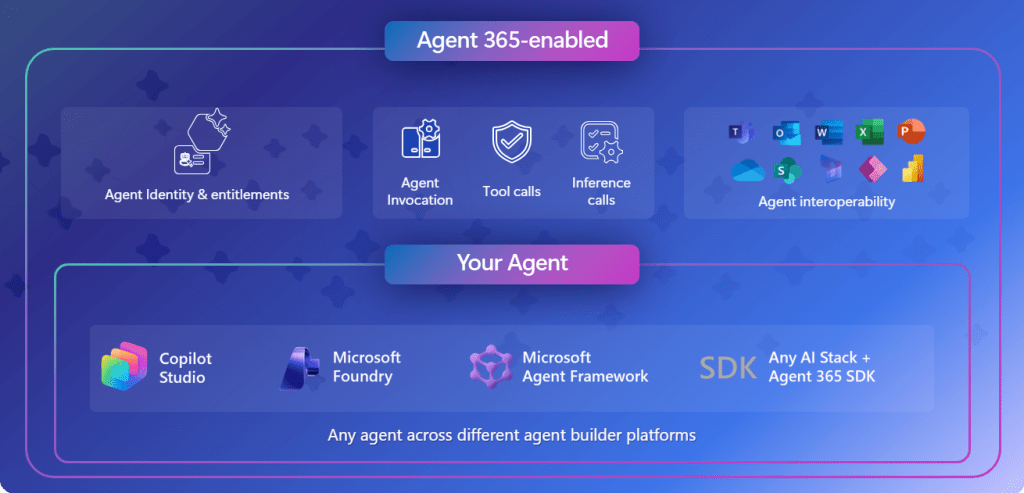
Then on top is Agents 365 SDK, which provides an enterprise observability and governance layer on top of the Agents SDK solution or any agentic solution (not just Agents SDK or Framework) to enable seamless integration with identity, open telemetry and M365 workloads. Documentation details here – https://learn.microsoft.com/en-us/microsoft-agent-365/developer/
Example:
Now let’s take an example scenario to explore as below.
Legal case analysis: A law firm creates a standalone AI agent using Foundry. The agent uses a custom-trained LLM for case law analysis and integrates with external legal databases. The agent is used in the firm’s case management system but should also be accessible within Microsoft 365 Copilot and have access to documents in SharePoint.
Possible Solution Approach:
- Build the core Agentic solution using Microsoft Agent framework, using the custom trained LLM model for case analysis. This could be a single agent or multi agent solution based on the flow with relevant MCP Servers/Tools to analyze the cases information. Using Agent framework allows easy tool management and lifecycle of the agent.
- To integrate easily with Microsoft 365 Copilot, we can use the Microsoft 365 Agents SDK which provides built-in templates to easily scaffold the project in VS code or Visual Studio. Use a standard activity protocol to handle communications easily with not only Microsoft 365 copilot but also other channels such as Microsoft Teams.
- After the above, use Agents 365 SDK to extend and integrate enterprise‑grade identity, observability, notifications, security, and governed access to Microsoft 365 data. Basically it adds enterprise capabilities such as Entra-based Agent identity, governed Work IQ tool access, Open Telemetry based observability, notifications through the Activity protocol, and agent ID-driven governance.
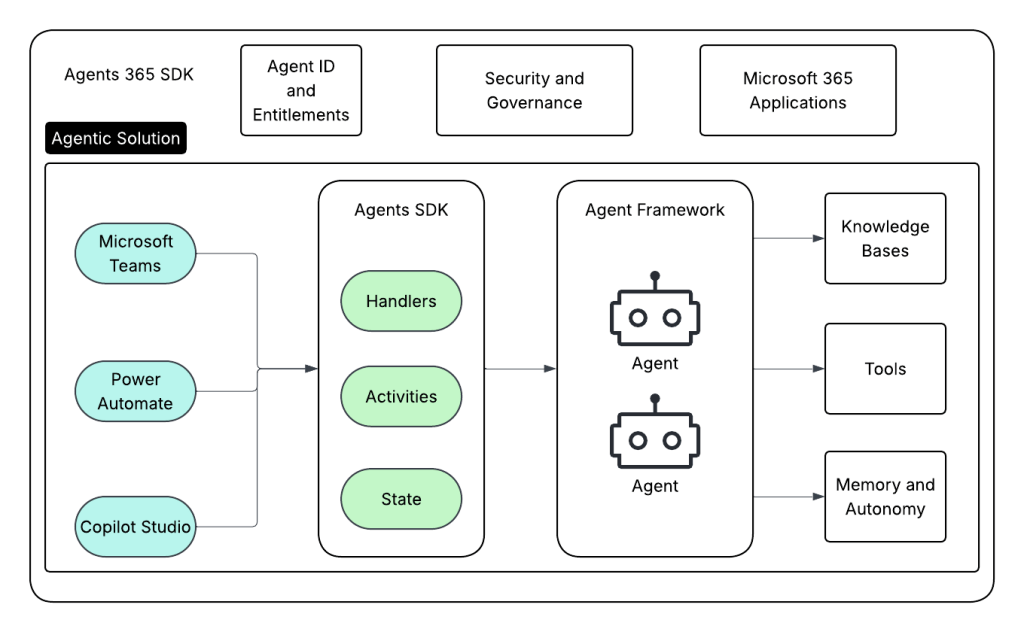
So in the above quick blog, we saw very how Agents SDK, Agents Framework and Agents 365 SDK differ but complement each other to provide an enterprise grade Agentic hosting platform.
 Tech Huddle
Leave a comment