 by
by GitHub and Azure DevOps are among the leading DevOps platforms, while Azure is one of the most common cloud platforms for hosting applications and services. This post explores how Agentic DevOps and DevSecOps can work together across GitHub, Azure DevOps, and Azure SRE Agent capabilities. It shows how agentic workflows can improve code management, security review, incident response, and operational follow-up across the software delivery lifecycle.
Traditionally, DevOps has been the process in managing a scalable code management and CI/CD pipelines for systems. But DevOps has been evolving and now we discuss about Agentic DevOps allowing Agents to assist with build and management of code. For more details on Agentic DevOps check here – Agentic DevOps: Tips and tricks
Following DevOps, DevSecOps has become a prominent extension that expands the focus beyond code management and CI/CD pipelines. It also requires teams to ensure that code is secure, reliable, and not risk-prone. The process does not stop at deployment; it also needs regular monitoring, release updates, and operational feedback.
To support DevSecOps across the code build and management lifecycle, we can use developer agentic workflows to make security-aware development smarter, better managed, and more controlled.
Additionally, Azure SRE agent enables us to manage our deployments better by monitoring and acting on the Azure hosted resources
Developer Agentic Workflows
Developer agentic workflows enable agentic and vibe-coding tools to use defined rules, references, and standards when building, managing, and releasing code.
For e.g. Agentic workflows can be used to create and manage issues in a project based on reviewing test results or feedbacks.
They can work at the repository or project or solution level.
To look at examples, let’s see two scenarios.
- Using GitHub Repo with GitHub Copilot and GitHub Actions
- Using Azure DevOps MCP Server with GitHub Copilot (we will look at this in next blog post)
Agentic workflows with GitHub
Agentic workflows with GitHub can be implemented through GitHub Actions. In this structure, the agentic workflow is written as a Markdown file under the GitHub workflows folder, and compiled .lock.yml files are generated from those Markdown files.
your-project/
├── .github/
│   └── workflows/
│       ├── ci.yml                      ← Traditional GitHub Actions workflow
│       ├── daily-repo-status.md        ← Agentic workflow (source)
│       ├── daily-repo-status.lock.yml  ← Compiled GitHub Actions YAML
│       ├── issue-triage.md             ← Another agentic workflow
│       └── issue-triage.lock.yml       ← Its compiled output
├── src/
└── ...
Each .md file has the following main components:
- On: trigger events
- Permissions: permissions for the workflow
- Safe-outputs: items to generate
Sample file:
---
# YAML Frontmatter — Configuration
on:
  schedule: daily

permissions:
  contents: read
  issues: read

safe-outputs:
  create-issue:
    title-prefix: "[report] "
    labels: [report]
    close-older-issues: true

engine: copilot
timeout-minutes: 20
---

# Markdown Body — Natural Language Instructions

Everything below the frontmatter is your prompt.
The AI agent reads these instructions and executes them.

## What to do

1. Analyze recent repository activity
2. Generate a summary report
3. Create an issue with the findings
When the workflow is compiled, it creates a .lock file with schema validation, safety checks and security scanning.
After the workflow is run with the specified trigger such as schedule, worflow_dispatch etc., then agentic workflow will execute and build the outputs as specified in safe outputs.
For the sample file above, it will generate a report with repository activity, summary report and create an issue.
With this agentic workflow, we can use text prompts to execute actions that would otherwise require complex conditional logic.
Azure SRE agent
Now that we have built the code and deployment pipeline and deployed the code to Azure resources, we need to ensure those deployments are continuously monitored and managed for health issues.
The Azure SRE Agent continuously monitors Azure resources, detects anomalies, and provides actionable insights. It can autonomously or collaboratively execute tasks such as diagnosing root causes, mitigating incidents, and optimizing resources.
Let’s look at a sample process such as critical P1 ticket handling.
Use case: The requirement is to handle high-priority P1 tickets during off-hours. The process below shows how an automated workflow can route the ticket through an Azure SRE Agent and use an approval flow to trigger the proposed change or fix.
Trigger: The incident is triggered and received by the incident management application
- Acknowledges the incident — Incident Application shows “Acknowledged by SRE Agent”
- SRE Agent Investigates automatically
- Queries App Insights: memory at 94%, trending up over 2 hours
- Checks deployment history: no recent deploys
- Recalls from memory: “Last time this happened, restart resolved it”
- SRE Agent Proposes a fix — Posts to the incident thread:
 Memory at 94% on prod-api (App Service).
Recommended action: Restart the App Service.

Evidence:
- Memory climbing since 1:30 AM
- No recent deployments
- Past incident: restart resolved similar issue on 2026-01-15

[Approve] [Deny] - You approve (or in Autonomous mode, agent executes immediately)
- Agent executes and verifies
✓ Restarted prod-api
✓ Memory now at 42%
✓ Incident resolved
What happened: You clicked Approve and the agent handled investigation, action, and verification.
This example shows how the SRE Agent can investigate issues, recommend fixes based on historical context, and use human review or approval before taking action.
The above example is useful, but how do we use it in a DevSecOps scenario? Let’s consider the same case again, but this time the issue is not memory-related. Instead, it is related to container image hosting, which is handled through the CI/CD pipeline and caused by a recent release. In this case, the issue is well documented, and the solution is recorded in the Azure DevOps wiki.
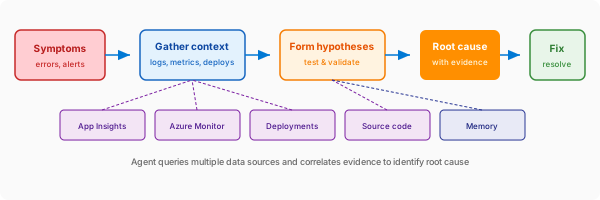
In this scenario, the SRE Agent can search the wiki, find the “Payment Service Troubleshooting” page, and respond with the documented procedure. The response includes a citation that links back to the original wiki page in Azure DevOps. The SRE Agent can then look up the code, determine the fix that needs to be applied, create a bug-fix work item, and tag the engineer for review and scheduling.
Once the work item is created, the developer can prioritise it in the task list for the day. This saves time that would otherwise be spent triaging the issue, reviewing the evidence, and creating the work item manually, which can become an administrative overhead for the team.
Below is an example flow of how the Azure SRE Agent looks at different sources to identify and recommend next steps.
Conclusion
In this blog, we looked at different options for agentic workflows using code management systems such as GitHub and extended the concept to the next level with agents such as Azure SRE Agent. In upcoming blogs, we will go deeper into specific scenarios and examples.
References
Agentic Workflows
https://docs.github.com/en/copilot/concepts/agents/about-github-agentic-workflows
https://github.blog/ai-and-ml/automate-repository-tasks-with-github-agentic-workflows/
Azure SRE Agent
https://learn.microsoft.com/en-us/azure/sre-agent/azure-devops-wiki-knowledge
https://learn.microsoft.com/en-us/azure/sre-agent/root-cause-analysis


Leave a Reply